An accurate inventory list helps a business keep track of the physical items it owns, from raw materials and work-in-progress goods to finished products ready for sale. By recording quantities, item descriptions, locations, and values, businesses can monitor stock levels, reduce waste, and make better purchasing decisions.
Whether you manage a small retail store, warehouse, manufacturing operation, office, or online shop, an organized inventory list makes it easier to understand what you have and what needs attention. It can also support stock counts, purchasing plans, and inventory valuation when records are maintained consistently.
In this guide, you will learn what an inventory list is, which details to include, how to create one, and how to maintain accurate stock records. You will also find practical tips and a printable inventory list template to help you get started.
What Is an Inventory List?
An inventory list is a detailed record of the items a business owns or holds for its operations. It typically identifies each item, records the quantity available, and includes other details needed to track, control, and value inventory.
Depending on the business, an inventory list may cover raw materials, components, work-in-progress items, finished goods, merchandise for resale, packaging supplies, and operating supplies. Businesses can maintain separate lists for different departments, storage locations, or inventory categories.
A well-maintained inventory list helps answer important questions: What items are available? How many units remain? Where are they stored? Which products need replenishment? What is the estimated value of the stock on hand?
Free Printable Inventory List Template
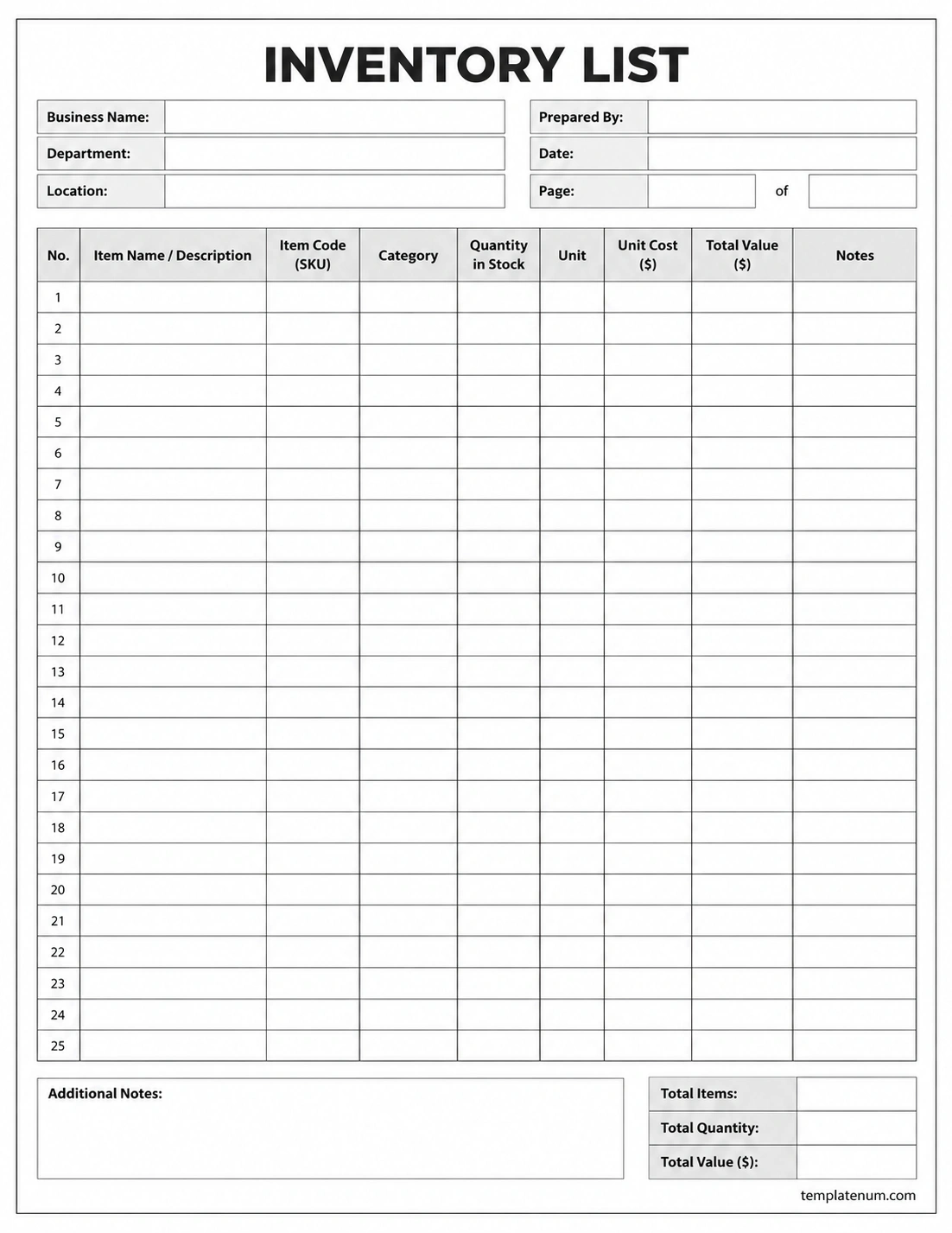
A printable inventory list template provides a straightforward way to record stock information on paper. It is useful for small businesses, offices, retail stores, workshops, and warehouses that need a simple record of their physical inventory.
The template below features a clean black-and-white layout with fields for business details, item descriptions, stock codes, categories, quantities, units, unit costs, total values, and notes. It also includes space for inventory totals and additional comments.
You can print the inventory list and complete it by hand during a stock count, or use its column structure as a starting point for a spreadsheet. Adjust the fields to match the type of inventory you manage.
What Should an Inventory List Include?
The right inventory list fields depend on your business and the decisions you need to make. A basic list can track item names and quantities, while a more detailed inventory record can support purchasing, stock control, and valuation.
1. Item Name and Description
Give each item a clear, recognizable name. Include useful details such as brand, model, size, color, material, or product variation when these characteristics distinguish one item from another.
Consistent descriptions reduce confusion during stock counts and help employees identify the correct products.
2. SKU or Item Code
A stock keeping unit (SKU) or internal item code provides a unique identifier for each inventory item or product variation. It is especially useful when several products have similar names or appearances.
Use a consistent coding system and avoid assigning the same code to different items. If your business already uses barcodes or product identifiers, include them where practical.
3. Category and Storage Location
Categories group similar items together, such as raw materials, finished goods, office supplies, or packaging materials. A storage location identifies where an item can be found, such as a warehouse, shelf, room, or bin.
These fields make it easier to organize stock counts, locate products, and review inventory by department or location.
4. Quantity on Hand and Unit of Measure
Record the number of units physically available at the time of the count. Choose a suitable unit of measure, such as pieces, boxes, kilograms, liters, or meters.
Use the same unit consistently for each item. If products are stored in multiple packaging sizes, document how cases, packs, and individual units relate to one another.
5. Unit Cost and Total Inventory Value
Unit cost records the applicable cost per unit under your chosen inventory valuation method. The total inventory value for an item can then be calculated using the quantity and the relevant unit cost.
For a simple example, if a business has 40 units recorded at $5 each, the extended value is $200. Actual accounting valuation may require a method such as FIFO or weighted-average cost, depending on the business and applicable accounting requirements.
6. Reorder Level and Notes
A reorder level indicates when stock may need replenishment. It helps businesses identify items that are approaching a shortage before customer orders or production are affected.
A notes field can record damaged units, pending deliveries, stock adjustments, expiration dates, or other details that affect inventory management.
Types of Inventory to Include in Your List
Inventory requirements vary by industry. Understanding the different inventory categories helps you build a list that reflects what your business actually owns and manages.
Raw Materials
Raw materials are inputs used to manufacture products. Examples include fabric for clothing, wood for furniture, flour for baked goods, and metal components for machinery.
Tracking raw materials helps production teams monitor availability and plan purchases before shortages interrupt operations.
Work-in-Progress Inventory
Work-in-progress (WIP) inventory consists of goods that have entered production but are not yet finished. Depending on the manufacturing process, these items may include partially assembled products, processed materials, or unfinished components.
Businesses may track WIP by production stage, batch, work order, or location. Its valuation can include applicable material, labor, and manufacturing overhead costs under the relevant accounting policy.
Finished Goods
Finished goods are products that have completed production and are ready for sale or distribution. Retailers and manufacturers often monitor these items closely to maintain availability and fulfill customer orders.
Recording quantities by SKU, location, and condition can help identify fast-moving products, slow-moving stock, and items that need replenishment.
Supplies and Other Stock
Businesses may also track packaging materials, maintenance supplies, spare parts, and office supplies. These items may not all qualify as inventory for financial reporting purposes, so distinguish merchandise and production inventory from supplies or other assets when needed.
How to Create an Inventory List Step by Step
Creating a reliable inventory list starts with a physical count and a consistent method for recording the results. Follow these steps to build a practical stock record.
- Step 1: Define the scope. Decide which items, departments, and storage locations the list will cover.
- Step 2: Prepare the fields. Include item names, codes, categories, quantities, units, locations, and any cost information you need.
- Step 3: Count physical stock. Inspect the items on hand and record actual quantities rather than relying only on old records.
- Step 4: Identify each item. Use SKUs, labels, barcodes, or clear descriptions to prevent duplicate or ambiguous entries.
- Step 5: Record condition and discrepancies. Note damaged, expired, missing, or otherwise unusable items separately where appropriate.
- Step 6: Calculate relevant totals. Extend quantities by the appropriate unit cost and verify formulas or calculations.
- Step 7: Review and approve the list. Compare the results with existing records and investigate significant differences.
- Step 8: Set an update schedule. Record stock receipts, sales, transfers, returns, and adjustments so the list remains useful after the initial count.
Inventory List Example
A simple inventory list can use a few essential columns to make stock levels easier to understand. The example below illustrates how a small business might organize its records.
- Item: Printer paper
- SKU: SUP-001
- Category: Office supplies
- Location: Storage room A
- Quantity on hand: 25 reams
- Unit cost: $4 per ream
- Extended value: $100
- Notes: Reorder when stock reaches 10 reams
This example demonstrates a basic stock record rather than a complete accounting valuation. For more complex inventory, maintain separate records for different locations, batches, expiration dates, or cost layers where necessary.
How to Maintain Accurate Inventory Records
An inventory list is most useful when it reflects actual stock. Establishing clear procedures for recording changes helps reduce errors and makes stock information more reliable.
Update Records When Stock Changes
Record receipts, sales, production usage, returns, transfers, and approved adjustments promptly. Waiting until the end of the month can make it harder to identify where discrepancies occurred.
Perform Regular Stock Counts
Compare recorded quantities with physical stock on a schedule appropriate to your business. Some businesses count all items periodically, while others use cycle counting to check selected items throughout the year.
Investigate Discrepancies
When the physical count differs from the inventory list, investigate possible causes before changing the record. Common reasons include recording errors, damaged goods, unprocessed transactions, incorrect units, or misplaced items.
Use a Consistent Inventory System
A printable sheet can be sufficient for a small stockroom or a one-time inventory check. Businesses with frequent transactions, multiple locations, or many product variations may benefit from a spreadsheet or dedicated inventory management system.
Whatever method you choose, define who can update records, how adjustments are approved, and how often backups or reviews take place.
Common Inventory List Mistakes to Avoid
Even a simple stock list can become unreliable if basic controls are overlooked. Watch for these common problems:
- Duplicate item records: Use consistent item codes and descriptions to prevent the same product from appearing under multiple entries.
- Inconsistent units: Clearly distinguish individual units, packs, cases, weight, and volume.
- Outdated quantities: Update the list whenever stock changes and investigate unexplained differences.
- Missing locations: Record storage locations when items are held across multiple rooms, shelves, or warehouses.
- Incorrect cost assumptions: Use an appropriate and consistent valuation method instead of assuming every item has the same cost.
- Poor separation of item types: Distinguish raw materials, WIP, finished goods, and supplies where those categories matter to operations or reporting.
Frequently Asked Questions About Inventory Lists
What is the purpose of an inventory list?
An inventory list records the items a business holds, their quantities, and other relevant details. It helps monitor stock, identify shortages, plan purchases, investigate discrepancies, and support inventory valuation.
What should an inventory list include?
A useful inventory list typically includes item descriptions, SKUs or item codes, categories, storage locations, quantities, units of measure, and notes. Unit cost, total value, reorder levels, and condition details can be added when needed.
What is the difference between an inventory list and a stock list?
The terms are often used interchangeably. Both can refer to a record of items and quantities on hand, although the exact fields and purpose depend on the business and its inventory procedures.
How often should an inventory list be updated?
Update inventory records whenever relevant stock movements occur, including receipts, sales, transfers, and adjustments. Physical counts should be scheduled according to the value, movement, and risk associated with the items.
Can I use Excel for an inventory list?
Yes. A spreadsheet can track item codes, quantities, locations, costs, and reorder levels. Use consistent data entry, formulas, access controls, and backups to reduce errors. More complex operations may need dedicated inventory software.
How do I calculate total inventory value?
For a basic item-level calculation, multiply the quantity by the applicable unit cost. For financial reporting, the valuation method must follow the relevant accounting requirements and may involve FIFO or weighted-average cost rather than a simple current purchase price.
Should raw materials, work-in-progress, and finished goods be listed separately?
They should be clearly identified, whether in separate lists or distinct categories within one system. These inventory types serve different operational purposes and may require different counting and valuation procedures.
Keep Your Stock Organized with an Inventory List
A reliable inventory list gives businesses a clearer view of the physical stock they hold, from raw materials and work-in-progress items to finished goods and other supplies. By recording consistent item details, quantities, locations, and applicable costs, you can improve stock control and make more informed purchasing decisions.
Start with a simple inventory list template, count your items carefully, and establish a routine for updating records. As your business grows, you can expand the list or move to a spreadsheet or inventory management system that supports your needs.
Download: Inventory List Template
