An issue log is an essential project management tool that helps teams record problems, assign responsibility, and prioritize solutions. During a project, unexpected challenges can affect deadlines, budgets, quality, and communication. Without a clear tracking system, important issues may be overlooked or remain unresolved for too long.
Using an issue log template makes it easier to document each problem, monitor its status, and keep team members informed. Whether you manage a small task, a business initiative, or a complex project, an organized issue register helps you respond to challenges before they create bigger disruptions.
In this guide, you will learn what an issue log is, which details to include, how to create and maintain one, and how a printable issue log template can help managers keep projects organized.
What Is an Issue Log?
An issue log is a structured record of problems, obstacles, and unexpected situations that arise during a project. It helps project managers and team members document each issue, evaluate its importance, assign an owner, and track progress until the problem is resolved.
Common examples include delayed deliverables, missing information, technical errors, resource shortages, approval delays, and communication problems. By recording these issues in one place, a team can make informed decisions instead of relying on scattered emails, meeting notes, or memory.
An issue log may be maintained in a spreadsheet, project management application, shared document, or printable worksheet. The best format is one that the team can update consistently and review easily.
Why Is an Issue Log Important in Project Management?
Projects rarely proceed exactly as planned. Even a well-organized team can encounter unexpected problems that require investigation, decisions, or corrective action. An issue log provides a consistent process for handling these challenges.
1. Improves Visibility
A centralized issue log gives managers a clear overview of current problems, their severity, and the people responsible for addressing them. Team members can quickly identify which issues need attention and which are already being handled.
2. Helps Prioritize Work
Not every issue has the same impact. A minor formatting error may require little attention, while a blocked approval could delay an entire project. Recording priority and impact helps the team focus on the most urgent problems first.
3. Establishes Accountability
Assigning an owner to each issue clarifies who is responsible for investigating the problem and coordinating the next steps. A target resolution date also helps the team follow up before an issue becomes overdue.
4. Supports Better Communication
An issue log creates a shared reference for project meetings and status updates. Instead of discussing problems without a record, team members can review the latest information, identify outstanding actions, and agree on what should happen next.
5. Creates a Record for Future Projects
Documented issues can reveal recurring problems, process weaknesses, and opportunities for improvement. Reviewing previous issue logs helps managers prepare for similar challenges in future projects.
Printable Issue Log Template
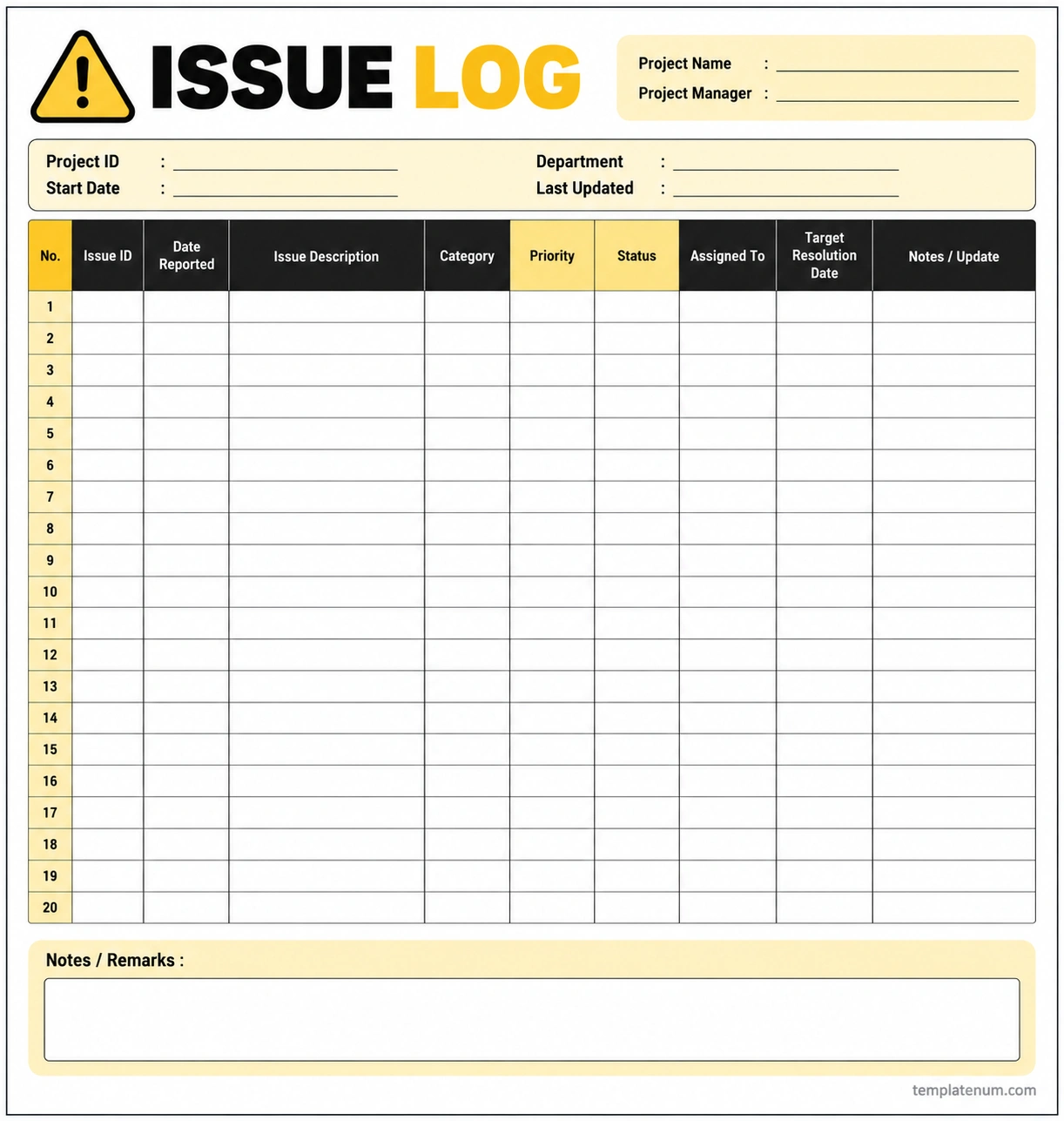
A printable issue log template provides a simple way to record and monitor project issues without requiring specialized software. It is especially useful for small projects, team meetings, paper-based workflows, and managers who prefer to review information on a printed page.
The template below uses a clean black, yellow, light-yellow, and white design. It includes project information fields, a numbered table for recording up to 20 issues, and a notes section for additional remarks. The table provides space for issue IDs, reporting dates, descriptions, categories, priorities, statuses, assigned owners, target resolution dates, and updates.
Use the worksheet to record issues as they arise, review progress during meetings, and identify items that need immediate attention. For larger projects, a spreadsheet or project management platform may be more suitable for sorting, filtering, and tracking a high volume of issues.
What Should an Issue Log Include?
A useful issue log contains enough information to help the team understand each problem and take appropriate action. The exact fields may vary depending on the size and complexity of the project.
Issue ID
Give every issue a unique identifier, such as ISS-001 or ISS-002. Unique IDs make it easier to refer to specific problems in meetings, reports, and follow-up messages.
Date Reported
Record when the issue was first identified or reported. This helps the team understand how long the problem has remained open and whether it requires escalation.
Issue Description
Describe the problem clearly and objectively. Explain what happened, where it occurred, and how it affects the project. Avoid vague entries such as “There is a delay.” A more useful description identifies the delayed deliverable and its impact.
Category and Priority
A category helps group similar problems, such as technical, scheduling, resource, quality, or communication issues. Priority indicates how urgently the team should respond.
You can use labels such as High, Medium, and Low, provided the team understands what each level means. Consider the issue’s impact, urgency, and potential consequences when assigning priority.
Status
The status field shows the current stage of an issue. Common labels include Open, In Progress, On Hold, Escalated, and Resolved. Define these labels clearly so everyone uses them consistently.
Assigned Owner
Record the person responsible for coordinating the response. The owner may investigate the issue, contact stakeholders, arrange resources, or coordinate the resolution. Other team members can assist, but one clearly identified owner helps maintain accountability.
Target Resolution Date
Set a realistic target date for resolving the issue or completing the next major action. This date should reflect the issue’s priority, complexity, dependencies, and available resources.
Notes and Updates
Use this field to record important developments, decisions, actions taken, and outstanding questions. Keep updates concise and include dates when the history of an issue matters.
How to Create and Maintain an Issue Log
Creating an issue log is straightforward, but its value depends on how consistently the team uses it. Follow these steps to build a practical process.
Step 1: Choose a Suitable Format
Select a printable worksheet, spreadsheet, shared document, or project management tool. Consider the number of issues, the size of the team, and whether multiple people need to update the record.
Step 2: Record Issues Promptly
Add an issue as soon as it is identified. Include the reporting date, a clear description, and any known impact. If some details are unknown, record what is available and update the entry when more information becomes available.
Step 3: Assess the Impact and Priority
Determine how the issue affects project objectives, deadlines, costs, quality, or stakeholders. Assign a priority based on agreed criteria rather than personal preference alone.
Step 4: Assign an Owner
Identify one person responsible for coordinating the next steps. Make sure the owner understands the issue, has the authority or support needed to act, and knows when an update is expected.
Step 5: Define the Next Action
Specify what needs to happen next. For example, the owner may need to investigate a technical failure, obtain approval, confirm a delivery date, or arrange additional resources. A clear next action makes the issue easier to manage.
Step 6: Review Progress Regularly
Review open issues during project meetings or at an agreed reporting interval. Check overdue items, changed priorities, blocked actions, and issues that may require escalation.
Step 7: Verify and Close Resolved Issues
Do not close an issue simply because someone reports that work is complete. Confirm that the solution addresses the original problem and that any necessary stakeholders have accepted the outcome. Record the resolution and closure date when appropriate.
Best Practices for Managing Project Issues
A well-maintained issue log should make decisions easier, not create unnecessary administrative work. These practices help keep the process useful.
- Use clear descriptions. Record facts and project impacts instead of vague comments or blame.
- Keep entries concise. Include the information needed for action without turning every row into a long report.
- Define priority levels. Agree on what High, Medium, and Low mean before the team begins using the log.
- Assign clear ownership. Make sure every active issue has a responsible person.
- Set realistic deadlines. Choose target dates that reflect the work required and any dependencies.
- Update status consistently. Make changes when new information arrives or an action is completed.
- Escalate critical issues. Raise problems promptly when they exceed the owner’s authority or threaten major project objectives.
- Limit unnecessary access. Follow the organization’s rules when an issue contains confidential, personal, or sensitive business information.
- Review recurring problems. Look for patterns that may indicate a process weakness or a need for preventive action.
Issue Log vs. Risk Register
An issue log and a risk register are related project management tools, but they serve different purposes. Understanding the distinction helps managers choose the right record for each situation.
Issue Log
An issue log tracks a problem that has already occurred or is currently affecting the project. It focuses on the response, ownership, status, and steps required to resolve the situation.
Risk Register
A risk register records uncertain events that may affect the project in the future. It typically includes the likelihood of each risk, its potential impact, and planned mitigation or contingency actions.
For example, a supplier delivery that has already been missed belongs in the issue log. The possibility that a supplier may miss a future delivery can be recorded in the risk register.
Some projects use both tools together. A risk that occurs can be documented as an active issue, while the risk register can retain useful information about related future uncertainties.
Frequently Asked Questions About Issue Logs
What is the main purpose of an issue log?
The main purpose of an issue log is to record project problems, prioritize responses, assign responsibility, and track each issue until it is resolved or formally closed. It helps managers maintain visibility and accountability.
Who is responsible for maintaining an issue log?
The project manager often oversees the issue log, but team members may report new issues and update the entries assigned to them. The specific responsibilities should be agreed upon at the beginning of the project.
How often should an issue log be updated?
Update the log whenever a meaningful change occurs, such as a new issue, a change in priority, a completed action, or a resolution. Review open issues regularly according to the project’s pace and level of risk.
What is the difference between an issue log and a problem log?
The terms are often used interchangeably in project environments. Both generally document problems that need attention. The exact meaning depends on the organization’s processes and terminology.
Can I use an Excel spreadsheet as an issue log?
Yes. A spreadsheet can work well for small and medium-sized projects because it allows teams to organize entries, filter by status, sort by priority, and track owners and deadlines. Larger projects may benefit from dedicated project management software.
What are common issue log status labels?
Common status labels include Open, In Progress, On Hold, Escalated, and Resolved. Some teams also use Closed to distinguish a verified resolution from an issue that is still awaiting final confirmation.
How do I prioritize issues in a project?
Evaluate each issue based on its impact, urgency, dependencies, and potential consequences. Give immediate attention to issues that threaten safety, compliance, critical deadlines, or major project objectives, following the organization’s escalation procedures.
When should an issue be closed?
Close an issue after the agreed resolution has been implemented and verified. Record the outcome and any relevant closure details so the team can refer to the decision later.
Conclusion
An issue log is a practical tool for keeping project problems visible, organized, and actionable. By recording clear descriptions, assigning owners, setting priorities, and monitoring progress, managers can respond to challenges more consistently and reduce the chance that important issues will be overlooked.
A printable issue log template is a useful starting point for small projects, meetings, and teams that prefer a straightforward paper-based system. For larger projects, a spreadsheet or dedicated project management platform may provide additional tracking and reporting features.
Choose a format that suits your workflow, update it regularly, and make issue reviews part of your project routine. A consistent process helps your team identify problems early, coordinate responses, and keep work moving toward its objectives.
Download: Issue Log Template
