An hours worked invoice is a practical way to bill a client for the time spent completing a project, task, or professional service. Instead of charging one fixed project price, the service provider records the hours worked and applies an agreed hourly rate to calculate the amount owed.
This type of invoice is commonly used by freelancers, consultants, contractors, virtual assistants, designers, developers, writers, tutors, and other professionals who charge clients based on time. A clear record of hours worked gives both the service provider and client a transparent view of the work completed and the amount being billed.
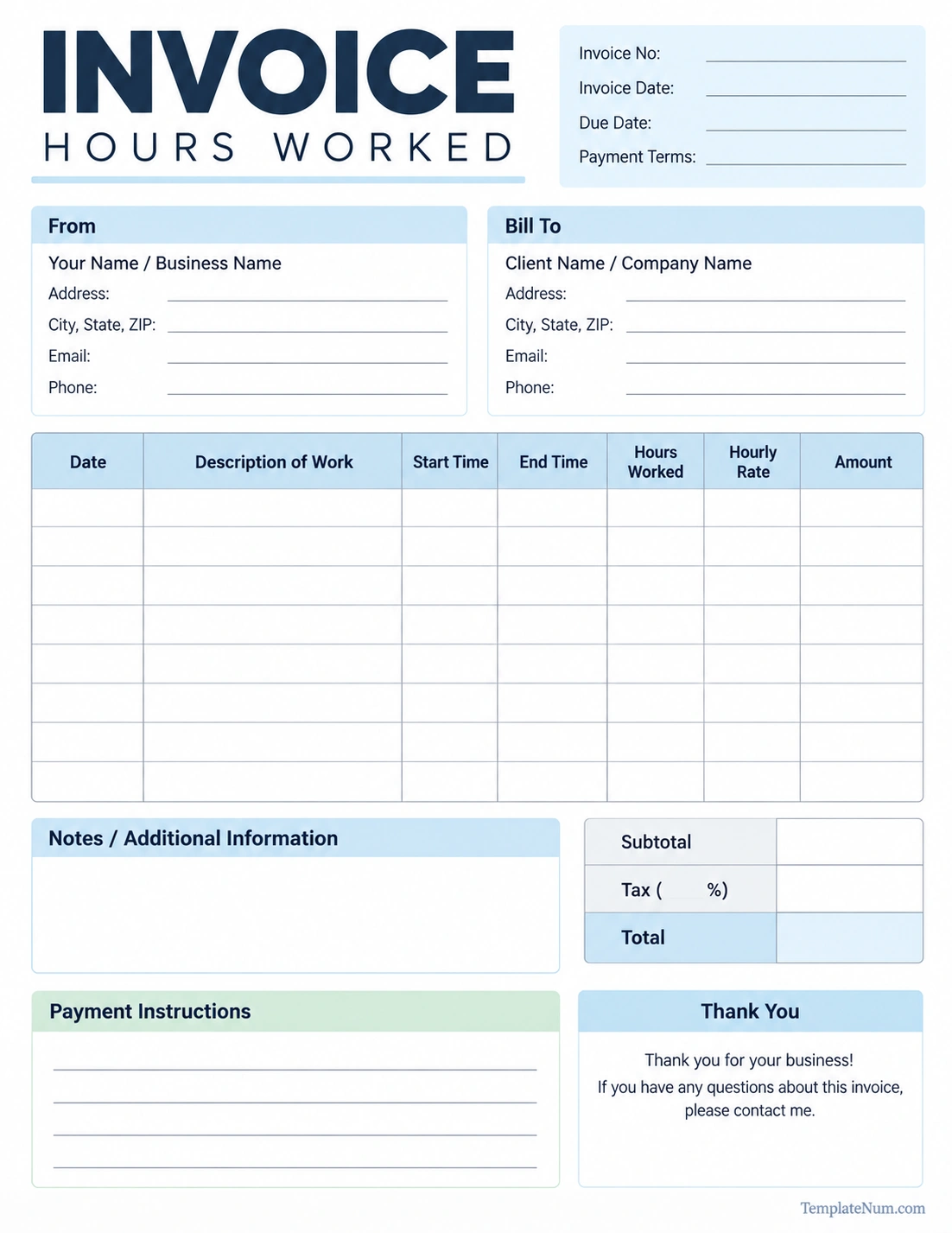
A well-organized hourly invoice can include the date, description of work, start and end times, total hours, hourly rate, and amount due. Using a printable hours worked invoice template can make the billing process easier while keeping important information organized.
What Is an Hours Worked Invoice?
An hours worked invoice is a billing document used to charge a client according to the amount of time spent providing a service. The invoice typically combines a work log with standard billing information, making it easy for the client to see how the final amount was calculated.
For example, a freelancer may work 12 hours on a website project at an hourly rate of $50. The invoice can show the individual work dates, descriptions of tasks, hours worked, hourly rate, and corresponding charges.
The basic calculation is simple:
Total Amount = Hours Worked × Hourly Rate
If multiple tasks have different rates or quantities, each line can be calculated separately before the amounts are added to the subtotal.
What Is an Hours Worked Invoice Used For?
The main purpose of an hourly invoice is to document services and request payment from a client. It creates a clear connection between the work performed and the amount being charged.
An hours worked invoice can be useful for:
- Freelance projects
- Consulting services
- Professional services
- Contract work
- Design and creative services
- Writing and editing
- Web development
- Virtual assistance
- Technical support
- Coaching and tutoring
- Administrative services
It can also serve as a useful record for both parties. The service provider has documentation of the work billed, while the client can review the services and time included in the invoice.
What Should an Hours Worked Invoice Include?
A professional hourly invoice should contain enough information for the client to understand who performed the work, what was completed, how the charge was calculated, and when payment is expected.
Invoice Number
Assign a unique invoice number to each invoice. A numbering system makes invoices easier to organize and reference later.
Invoice Date and Due Date
The invoice date identifies when the bill was issued. The due date tells the client when payment is expected according to the agreed payment terms.
Service Provider Information
Include the freelancer, contractor, or business name along with relevant contact information. Depending on the situation, this may include an address, email address, phone number, or business website.
Client Information
Add the client’s name or company name and appropriate contact details. This helps ensure the invoice is directed to the correct customer.
Description of Work
Describe the services performed during each billing period. Specific descriptions are generally more useful than vague entries such as “work completed.”
Hours Worked
Record the number of hours associated with each task or service. If the project requires detailed time tracking, the invoice can also show start and end times.
Hourly Rate
List the agreed rate for each applicable service. The rate should match the pricing terms established with the client.
Amount
Calculate the amount for each line item by multiplying the hours worked by the applicable hourly rate.
Subtotal, Tax, and Total
Include the subtotal and any applicable taxes or additional charges. The final total should clearly show the amount the client is expected to pay.
How to Calculate an Hourly Invoice
Creating an hourly invoice starts with accurate time records. Once the total hours and hourly rate are known, the charge for each service can be calculated.
Step 1: Record the Work Date
Enter the date when the service was performed. Keeping dates organized makes the invoice easier for the client to review.
Step 2: Describe the Work
Write a short description of the task completed. For example, a web developer might record “Homepage layout revisions” rather than simply writing “Website work.”
Step 3: Record the Hours
Enter the amount of time spent on the task. Use the same time-recording method consistently throughout the project.
Step 4: Apply the Hourly Rate
Multiply the number of billable hours by the agreed hourly rate.
Example: 5 hours × $60 per hour = $300.
Step 5: Add the Line Items
If the invoice contains several tasks, calculate each line separately and add the amounts to determine the subtotal.
Step 6: Add Applicable Charges
If taxes or other agreed charges apply, add them according to the applicable rules and the terms of the client agreement.
Step 7: Show the Final Amount
Clearly display the total amount due so the client can quickly identify the payment required.
Hours Worked Invoice vs. Timesheet Invoice
The terms hours worked invoice and timesheet invoice are often used for similar billing purposes, but they can emphasize different information.
A timesheet primarily records time. It may show when someone started and finished a task, how many hours were worked, and what activities were completed.
An hourly invoice uses that time information as part of a billing document. In addition to the work record, it normally includes the invoice number, client information, payment terms, hourly rates, totals, and payment instructions.
For this reason, a timesheet can be used to collect information before creating an invoice, while an hours worked invoice can combine the time record and payment request in one document.
Benefits of Using an Hours Worked Invoice Template
A reusable hours worked invoice template can save time and provide a consistent format for recurring client billing.
Saves Time
You do not have to recreate the same invoice structure every time a client needs to be billed. A template provides the basic sections in advance.
Keeps Billing Organized
A structured template helps keep dates, work descriptions, hours, rates, and totals in predictable locations.
Improves Transparency
Showing the work performed and the corresponding hours allows clients to understand how the invoice total was calculated.
Reduces Calculation Errors
A consistent format makes it easier to review calculations before sending the invoice to a client.
Creates a Professional Presentation
A clean invoice can make business communication easier and provide clients with a document they can save for their records.
How to Track Hours Before Creating an Invoice
Accurate billing begins with accurate time tracking. A service provider should record work as close as possible to the time it is performed rather than relying entirely on memory at the end of the billing period.
Useful information to record includes:
- Date of the work
- Project or client name
- Task description
- Start time
- End time
- Total billable hours
- Hourly rate
- Additional notes
Some professionals track time continuously throughout the day, while others record time after completing individual tasks. The important part is maintaining a consistent method that produces an accurate record.
Tips for Creating a Professional Hourly Invoice
Use Clear Descriptions
Make task descriptions specific enough that the client can understand what was completed. Clear descriptions can reduce unnecessary questions about individual charges.
Separate Different Tasks
When practical, list different services as separate line items. This makes the invoice easier to review than combining unrelated work into one large entry.
Double-Check Your Math
Review the hours, hourly rates, line-item amounts, subtotal, taxes, and final total before sending the invoice.
Follow the Client’s Billing Requirements
Some clients have specific requirements for invoice numbers, purchase orders, tax information, supporting documents, or submission methods. Follow any requirements that were agreed upon before billing.
Include Payment Terms
Clearly state when payment is due and include the accepted payment method or payment instructions.
Keep Copies of Your Invoices
Save copies of invoices and related time records according to your normal business and record-keeping practices. Keeping organized records makes it easier to reference previous work and payments.
Common Mistakes to Avoid on an Hours Worked Invoice
Even a simple hourly invoice can cause confusion if important information is missing or inconsistent.
- Missing invoice number: A unique number makes the invoice easier to reference.
- Unclear work descriptions: Vague descriptions can make it difficult for clients to understand the charges.
- Incorrect hours: Always compare the invoice against the original time records.
- Wrong hourly rate: Confirm that the rate matches the agreement with the client.
- Missing due date: Tell the client when payment is expected.
- Incorrect totals: Check every calculation before submitting the invoice.
- Missing payment instructions: Make it clear how the client can pay.
Who Can Use an Hours Worked Invoice?
An hourly invoice is suitable for many professionals whose fees are based on time rather than a fixed project price.
Common users include:
- Freelancers
- Consultants
- Independent contractors
- Graphic designers
- Web developers
- Copywriters
- Editors
- Virtual assistants
- Marketing professionals
- IT specialists
- Business advisors
- Tutors and instructors
The template can be adjusted to fit different types of services. For example, a consultant may use a detailed project description, while a virtual assistant may organize billing by administrative task.
When Should You Use an Hourly Invoice?
An hourly invoice is particularly useful when the exact amount of time required to complete the work cannot be determined in advance or when the client agreement specifically uses hourly billing.
It may be appropriate for ongoing consulting, maintenance, troubleshooting, support, revisions, research, administrative work, and other services where the scope can change over time.
For projects with a clearly defined scope and fixed price, a standard fixed-price invoice may be more appropriate. The billing method should match the agreement established with the client.
Frequently Asked Questions About Hours Worked Invoices
What is an hours worked invoice?
An hours worked invoice is a billing document that charges a client based on the amount of time spent providing services. It normally includes work dates, descriptions, hours, hourly rates, and the total amount due.
Is an hours worked invoice the same as an hourly invoice?
Yes. The terms are commonly used to describe an invoice where the client is billed according to the number of hours worked and an agreed hourly rate.
What is a timesheet invoice?
A timesheet invoice is an invoice that incorporates time-tracking information into the billing document. It can show the dates, tasks, hours worked, hourly rates, and corresponding charges.
How do I calculate an hours worked invoice?
Multiply the number of billable hours by the applicable hourly rate for each task. Add the resulting line-item amounts together, then include any applicable taxes or additional charges to determine the final amount due.
What should an hourly invoice include?
An hourly invoice should generally include the service provider and client information, invoice number, invoice and due dates, description of work, hours worked, hourly rate, line-item amounts, subtotal, applicable taxes, total, and payment instructions.
Can freelancers use an hours worked invoice?
Yes. Freelancers commonly use hourly invoices when their services are billed according to time rather than a fixed project fee.
Can I use an hours worked invoice template for different clients?
Yes. A reusable template can be customized with the appropriate client information, project details, billing period, hourly rate, and payment terms for each invoice.
Conclusion
An hours worked invoice provides a straightforward way to bill clients for time-based services while showing how the final charge was calculated. By including work dates, task descriptions, hours, hourly rates, and clear payment information, the invoice creates a useful record for both the service provider and client.
Using a printable hours worked invoice template can make recurring billing easier and more consistent. Whether you are a freelancer, consultant, contractor, or other professional who bills by the hour, a clear invoice can help organize your work records and communicate charges in a professional format.
Download: Hours Worked Invoice Template
