An itemized receipt provides a clear breakdown of every product or service included in a purchase. Instead of showing only the final amount paid, it lists individual items, quantities, unit prices, and line totals. This detailed record helps customers understand what they purchased and allows businesses to maintain accurate transaction records.
Whether you run a retail store, provide professional services, manage a small business, or need documentation for expense reimbursement, an itemized receipt can make financial recordkeeping easier. It helps prevent confusion about charges and provides useful information when reviewing purchases, processing returns, or reconciling expenses.
In this guide, you will learn what an itemized receipt is, which details it should include, how it differs from a regular receipt, and how to create a practical receipt template for your business.
What Is an Itemized Receipt?
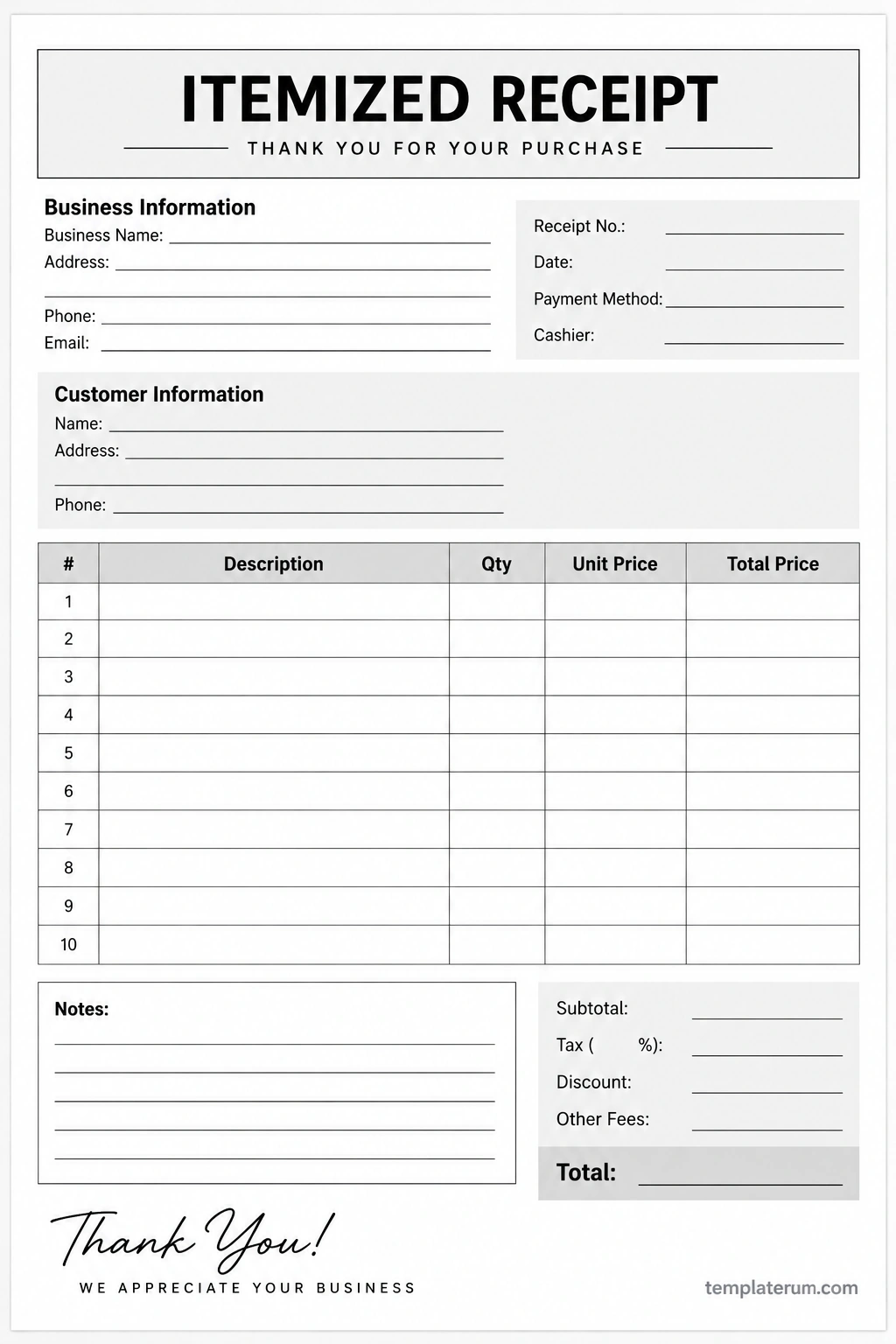
An itemized receipt is a transaction record that lists the individual goods or services purchased and shows how each line contributes to the total amount due. It typically includes a description of each item, the quantity purchased, the price per unit, and the total price for that line.
For example, a customer buying office supplies might receive an itemized receipt showing notebooks, pens, folders, and printer paper as separate entries. Each entry includes its quantity and price, followed by the subtotal, applicable taxes, discounts, additional fees, and final total.
This level of detail makes the receipt more informative than a record that displays only a single purchase amount. It allows both the customer and the business to review the transaction more easily.
What Does an Itemized Receipt Include?
A well-organized itemized receipt should contain enough information to identify the transaction and explain the charges. The exact requirements depend on the business, transaction type, and applicable regulations.
1. Business Information
The top section usually identifies the business that issued the receipt. Depending on the business and local requirements, this may include:
- Business name
- Business address
- Phone number or email address
- Business registration or tax identification details, when required
Clear business information helps customers identify the seller and contact the business if they have questions about the transaction.
2. Receipt and Transaction Details
Transaction details help distinguish one purchase from another. Common fields include the receipt number, transaction date, payment method, and cashier or employee name.
A unique receipt number can make it easier to locate a transaction when handling returns, customer inquiries, bookkeeping, or payment reconciliation.
3. Customer Information
Some businesses include the customer’s name, billing details, or other relevant information. This is particularly useful for business-to-business transactions, professional services, and purchases that require supporting documentation.
For ordinary retail sales, collecting customer information may not be necessary. Include only the details needed for the transaction and handle personal information appropriately.
4. Itemized Purchase Table
The purchase table is the main feature of an itemized receipt. It breaks the transaction into individual line items so that each charge can be reviewed separately.
A typical table contains the following columns:
- Item description: The name or description of the product or service.
- Quantity: The number of units purchased or the amount of service provided.
- Unit price: The price for one unit or service unit.
- Line total: The quantity multiplied by the unit price, adjusted for any applicable line-level discount.
For example, if a customer purchases three notebooks at $4 each, the line total is $12 before any applicable discounts or taxes.
5. Subtotal, Taxes, Discounts, and Final Total
After listing the purchased items, the receipt should summarize the transaction. Common fields include the subtotal, applicable taxes, discounts, additional fees, and final total.
The subtotal generally represents the sum of the line-item amounts before transaction-level taxes and other adjustments. The final total should reflect the charges and deductions that apply to the purchase.
Depending on the transaction, a receipt may also show the amount paid, outstanding balance, or change returned to the customer. Tax treatment and required disclosures vary by location and transaction type.
Itemized Receipt Example
The following example demonstrates how individual purchases can be listed clearly on a receipt. The amounts are illustrative and use US dollars.
- Notebook: 3 units × $4.00 = $12.00
- Pen set: 2 units × $5.50 = $11.00
- Folder: 4 units × $1.25 = $5.00
- Subtotal: $28.00
- Sales tax: $2.24
- Total: $30.24
In this example, the subtotal is the sum of the three line totals: $12.00 + $11.00 + $5.00 = $28.00. Adding the illustrative sales tax of $2.24 produces a final total of $30.24.
An actual receipt should use the correct tax rate, tax treatment, discounts, and fees for the specific transaction. The example is intended to demonstrate the layout rather than establish a tax rate for any particular location.
Itemized Receipt vs. Regular Receipt
The main difference between an itemized receipt and a basic receipt is the level of detail provided about the purchase.
Itemized Receipt
An itemized receipt lists each product or service separately, along with quantities and individual prices. It is useful when customers need to verify specific charges, track spending by category, or provide detailed documentation for reimbursement.
Regular Receipt
A basic receipt may focus on the transaction date, seller, payment method, and total amount paid. Some basic receipts include a brief description of the purchase without providing a full breakdown of every item.
Both types can serve as proof of purchase. However, an itemized receipt provides more detail when the individual components of a transaction matter.
How to Create an Itemized Receipt
You can create an itemized receipt using a printable template, spreadsheet, accounting application, point-of-sale system, or invoicing software. The best method depends on how frequently you issue receipts and how much detail your business needs.
Step 1: Add Business and Transaction Information
Start with the business name and relevant contact information. Add a unique receipt number and the transaction date so the record can be identified later.
Include customer details only when appropriate for the transaction. Keep the layout simple enough for customers to find important information quickly.
Step 2: List Each Product or Service
Enter each purchased item on a separate line. Use clear descriptions and record the correct quantity and unit price.
Calculate the line total by multiplying the quantity by the unit price, then apply any relevant line-level discount according to your pricing rules. Review each calculation before moving to the summary section.
Step 3: Calculate the Subtotal and Adjustments
Add the line totals to calculate the subtotal. Then apply the relevant taxes, discounts, shipping charges, service fees, or other adjustments.
Make sure each amount is classified correctly and avoid counting the same tax or fee twice. If different items receive different tax treatment, calculate and display the applicable amounts accurately.
Step 4: Confirm the Final Total
Check that the subtotal and adjustments produce the correct final amount. If the receipt records a completed payment, verify that the amount paid agrees with the transaction record.
For a manual template, review the arithmetic before issuing the receipt. If you use software, confirm that the settings for quantities, discounts, and taxes are configured correctly.
Step 5: Provide and Store the Receipt
Give the customer a printed or digital copy, as appropriate. Keep a corresponding business record according to your bookkeeping practices and any applicable record-retention requirements.
Store receipts securely and make them easy to retrieve. Organized transaction records can simplify bookkeeping, customer service, and financial reviews.
When Should You Use an Itemized Receipt?
Itemized receipts are useful whenever a clear breakdown of a transaction is important. Different industries may use them for different purposes.
- Retail stores: Show individual products, quantities, discounts, and applicable taxes.
- Restaurants and cafes: Break down food, beverages, modifications, and applicable charges.
- Professional services: Detail services, hours worked, rates, and other agreed charges where appropriate.
- Contractors and repair businesses: List labor, parts, materials, and related fees.
- Small businesses: Maintain detailed records of sales and support transaction reviews.
- Expense reimbursement: Provide supporting purchase details when required by an employer or organization.
Requirements differ by industry, employer, tax authority, and jurisdiction. If a receipt is needed for reimbursement, tax reporting, insurance, or another formal purpose, confirm which details the recipient requires.
Tips for Making a Professional Itemized Receipt
A professional receipt should be easy to read, accurate, and consistent with your business records. The following practices can help improve its quality.
- Use a clear layout: Separate business details, item descriptions, and totals into distinct sections.
- Choose readable fonts: Avoid overly decorative typefaces and very small text.
- Use consistent currency formatting: Display prices in a consistent format throughout the receipt.
- Check calculations: Verify quantities, line totals, discounts, taxes, and the final amount.
- Use unique receipt numbers: Make individual transactions easier to locate.
- Keep descriptions specific: Use clear product or service names rather than vague labels.
- Protect customer information: Collect and retain only appropriate information, using suitable safeguards.
- Keep records organized: Store copies according to your bookkeeping process and applicable rules.
Frequently Asked Questions About Itemized Receipts
What is an itemized receipt used for?
An itemized receipt provides a detailed record of the goods or services purchased. It helps customers verify charges and supports business bookkeeping, expense tracking, returns, and reimbursement requests when detailed documentation is required.
What is the difference between an itemized receipt and an invoice?
An itemized receipt generally documents a transaction or payment that has taken place. An invoice typically requests payment for goods or services supplied. Both can list individual items, quantities, prices, and applicable charges, but their purpose and timing differ.
Can I make an itemized receipt in Excel?
Yes. You can use Excel or another spreadsheet application to create a receipt with columns for item descriptions, quantities, unit prices, and line totals. Formulas can calculate subtotals and other amounts, but you should verify the formulas and tax settings before issuing the receipt.
Does an itemized receipt need to show tax?
Whether tax must be displayed separately depends on the applicable laws, transaction type, and business requirements. When taxes apply, showing the relevant amount clearly can help customers understand the final total.
Can an itemized receipt be handwritten?
Yes. A handwritten receipt can provide an itemized record if it includes the relevant transaction details and accurate calculations. Make sure the writing is legible and keep a copy if your business recordkeeping process requires one.
Is an itemized receipt proof of payment?
It can serve as evidence of a purchase or payment, depending on the information it contains and the circumstances. For a completed transaction, the receipt should accurately reflect the payment status. Some businesses may need additional records to verify payment.
What should I do if an itemized receipt contains an error?
Contact the business that issued the receipt and explain which information is incorrect. The business should review the underlying transaction and provide a corrected record when appropriate. Keep the original documentation and follow the business’s procedures for corrections.
How long should I keep itemized receipts?
The appropriate retention period depends on the purpose of the receipt, your location, and any applicable tax, accounting, employment, or business rules. Follow the relevant requirements and retain records long enough to support the transactions they document.
Conclusion
An itemized receipt provides a clear breakdown of individual products or services, making it easier to understand a purchase and verify the final amount. By listing descriptions, quantities, unit prices, line totals, and applicable adjustments, businesses can create more useful transaction records for customers and their own bookkeeping.
Whether you use a printable itemized receipt template, a spreadsheet, or accounting software, accuracy and readability should be your priorities. Include the details relevant to the transaction, check the calculations carefully, and store records securely.
Choose a receipt format that suits your business needs and use it consistently to keep transactions clear, organized, and easier to review.
Download: Itemized Receipt Template
